Label Print
A browser tool that turns a spreadsheet of device identifiers and SKUs into ready-to-print barcode labels. Everything runs locally in the page; nothing is uploaded.
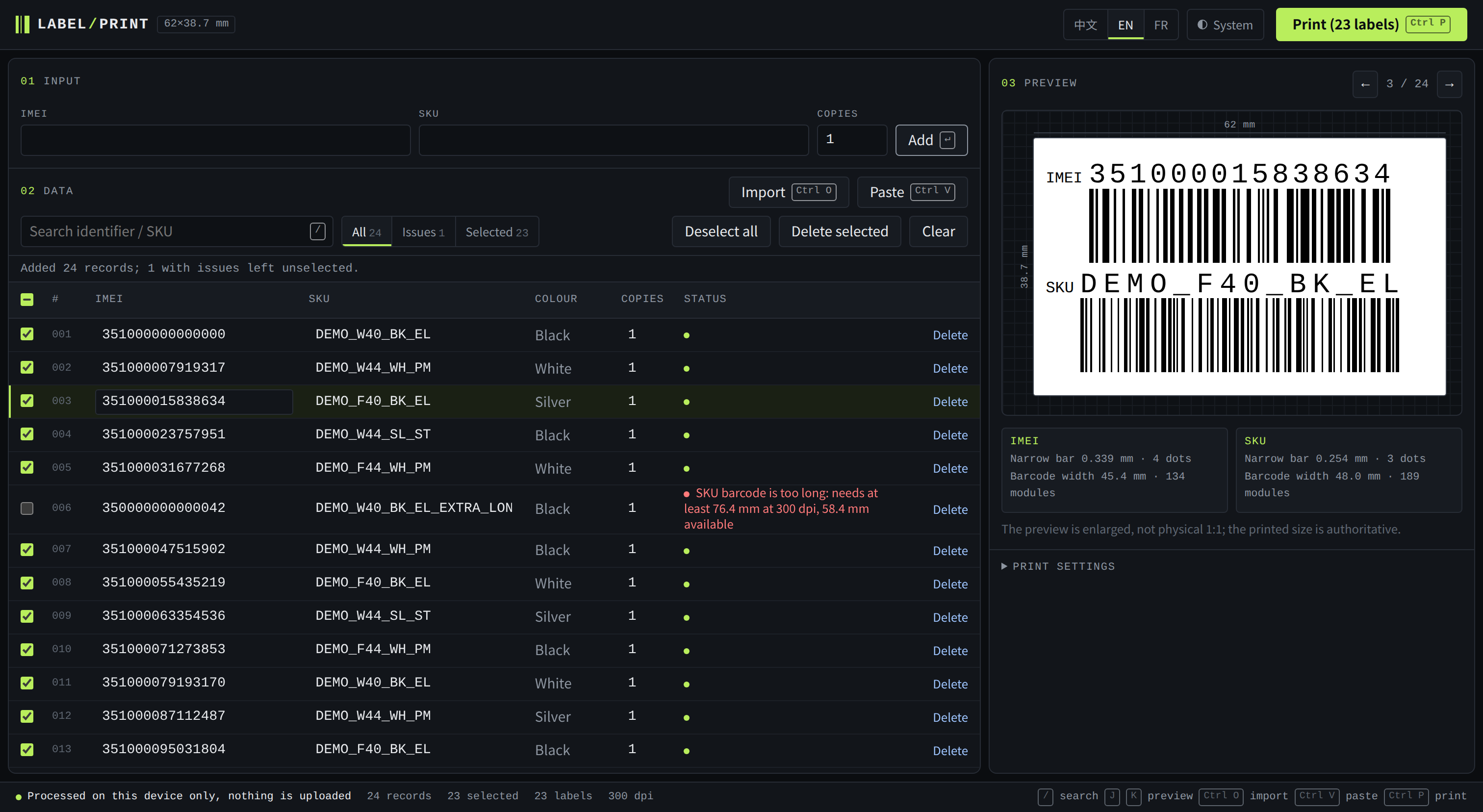
From a spreadsheet to a roll of labels
Type a record, paste rows copied from Excel, or drop an XLSX or CSV file anywhere on the page. Each product gets one label carrying two CODE128 barcodes — the IMEI or serial number and the SKU — with the text spread to the exact width of its barcode. Side-by-side tables in one sheet are read as separate groups, and identifiers stay strings: leading zeros, case, hyphens and underscores are never altered.
It refuses rather than guesses
Bars are drawn in whole printer dots at the chosen resolution, with full quiet zones, and stay inside the area the printer can actually print. A barcode that does not fit is reported instead of being squeezed or cropped. Empty fields, characters that cannot be encoded, numbers whose digits Excel may have lost, and one identifier paired with two different SKUs are flagged and left out of the print queue until someone has looked at them.
Made for daily use
The label size is adjustable and defaults to 62 × 38.7 mm on continuous tape. The interface is available in Chinese, English and French, in light and dark themes, with keyboard shortcuts for search, import, paste and print. The print button always shows the real number of labels, and the page never claims that something was printed: only the printer knows that.